


Tools Tab
IconMaker Tool
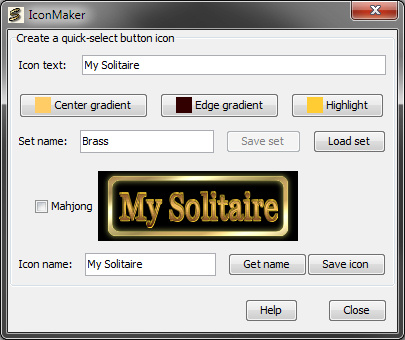
(Registered users only)
This tool provides a quick, easy and consistent way of producing quick-button icon files for solitaire games in the same style as for the factory games. Basically, it's a new in-house development tool released to the public, because why not?
As long as SoliLuxe is running, you can close and open the IconMaker any number of times without losing your work. Just remember to save any icon in progress before shutting down SoliLuxe!
Enter a text for the icon in the "Icon text" field. The result is immediately rendered using the current colour set in the full-size preview panel in the middle of the IconMaker Window. (If you want to precede the icon text with the SoliLuxe symbol for a mahjong game, check the "Mahjong" checkbox next to the preview panel.)
The text auto-adjusts itself to fill the entire icon width regardless of length, although it cannot be so long that it becomes ureadable — the limit is just over 20 characters. If you have a text shorter than 8 characters, proceed as follows to make it look less strange:
An icon colour set contains three different colours: The first two defines the middle and upper/lower colours of the text's gradient, and the third adds a bit of highlight to the edges.
You can adjust the colour set using the three colour buttons, which each present its current colour in a standard Java colour picker dialogue.
Tip: One way to quickly define a new colour set is to start by simply changing the hue of the colours in the HSB tab of the colour picker, rather than the saturation and brightness.
Any changes made to a colour is rendered in the preview panel immediately. You can save a colour set by giving it a name in the "Set name" field and clicking the "Save set" button. A number of pre-defined sets are delivered with the game and can be selected using the "Load set" button.
The Get name button puts the name of the currently selected game on the Games tab in the Icon text and Icon name fields.
The Save icon button saves the icon as a 160x45 PNG file in the /images subfolder under the name "SI-{name from Icon name field}.png".